 HappyMod.net
| Name | ZArchiver Donate |
| Publisher | zdevs |
| Size | 4.92 MB |
| Latest version | 1.0.10 |
| Released on | Jun 1, 2026 |
| Minimum Requirement | Varies with device |
| Get it on | Google Play |
| Languages | EN,FR,DE,ID,IT,JA,KO,PT,RU,ZH,ES,TH,ZH,TR,VI |
Table of Contents
UNLEASH THE POWER OF FILE MANAGEMENT WITH ZARCHIVER DONATE
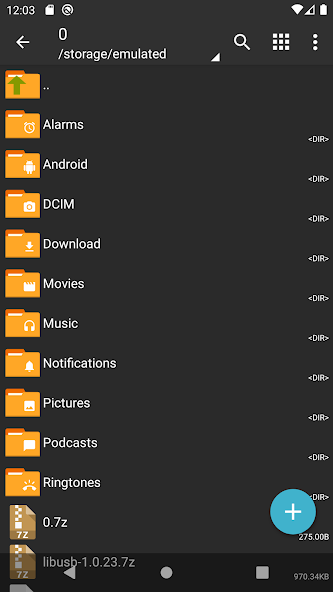
ZArchiver Donate is a powerful and user-friendly archive management tool that has become a staple for Android users looking to efficiently manage files. This app, designed for the purpose of creating, extracting, and viewing archived files, stands out for its intuitive interface and robust functionality. Whether you are dealing with zip, rar, or other common file formats, ZArchiver provides a seamless experience not only for extraction but also for creating compressed files. Users can access a myriad of features all intended to make file management simpler and more streamlined. With regular updates ensuring compatibility with the latest file formats and operating system versions, ZArchiver remains a reliable choice for both casual users and professionals seeking to organize their digital files efficiently.
- User-Friendly Interface: ZArchiver boasts an intuitive UI, making it accessible for users of all technical levels. The straightforward navigation ensures that even novice users can manage their archived files with ease.
- Wide Format Support: This application allows users to create and extract a variety of archive formats including .zip, .rar, .tar, and more, catering to diverse file management needs.
- Multi-Language Support: ZArchiver is available in multiple languages, enhancing its usability for a global audience and allowing users from different regions to operate the app comfortably.
EXPERIENCE SEAMLESS ARCHIVE CREATION WITH ZARCHIVER DONATE
Creating archives has never been more straightforward than with ZArchiver Donate. The app empowers users to quickly compile multiple files into a single compressed format, facilitating easier storage and sharing. Before creating an archive, users can choose their desired compression level and type, offering flexibility according to their specific needs. The ability to encrypt archives adds an extra layer of security for sensitive files, ensuring that users can protect their data effectively. ZArchiver’s speed in generating archives is noteworthy, and it efficiently handles large volumes of files without compromising on performance. Such features are invaluable for anyone looking to manage their files in a cluttered digital environment.
- Custom Compression Levels: ZArchiver offers various compression levels, allowing users to choose between faster compression times or smaller file sizes, depending on their priorities.
- Password Protection: Users can add password protection to their archives, enhancing security for sensitive documents and ensuring that unauthorized access is prevented.
- Batch Processing: The app allows for batch processing of files, making it easier than ever to archive multiple items at once, which saves time and enhances workflow efficiency.
EFFICIENT FILE EXTRACTION WITH ZARCHIVER DONATE
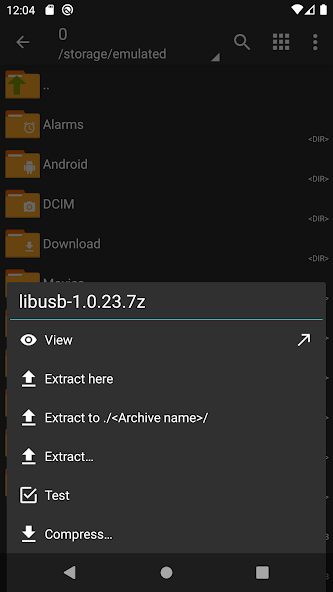
File extraction is a breeze with ZArchiver Donate. The application supports extracting files from various archive types, making it an essential tool for anyone dealing with compressed files. Users can extract specific files or entire folders, providing versatility based on their requirements at any moment. The extraction process is quick and efficient, with a clear progress indicator, allowing users to manage their expectations during the operation. Additionally, ZArchiver enables users to view the contents of archives before deciding to extract, which is particularly useful when navigating large compressed files. This feature-rich extraction capability is geared towards ensuring that users can access their files with minimal hassle.
- Flexible Extraction Options: ZArchiver enables users to selectively extract files, allowing for a focused approach in accessing only the necessary contents from an archive.
- Progress Indicators: A real-time progress bar during extraction keeps users informed about the status of their operations, reducing uncertainty and improving the overall user experience.
- Preview Functionality: Users can easily preview contents of an archive without the need to extract them, which saves time and aids in decision-making about what to extract.
TRULY PORTABLE FILE MANAGEMENT WITH ZARCHIVER DONATE
The portable nature of ZArchiver Donate makes it an ideal companion for users on the go. The app is lightweight and does not require excessive storage space, fitting seamlessly into any device without slowing it down. Its efficient design ensures that it can run effectively on older devices as well, broadening accessibility. With essential features like file browsing, users can navigate through their devices to locate and manage archives directly. Whether users are transferring files between devices or working across different platforms, ZArchiver proves to be a versatile tool in their arsenal, supporting a flexible and organized workflow.
- Lightweight Design: The app’s minimal footprint ensures that it does not consume excessive memory or processing power, making it suitable for low-spec devices.
- Integrated File Browser: ZArchiver comes with a file browsing feature that allows users to navigate their storage easily, bringing convenience to the archiving process.
- Access to External Storage: Users can directly access and manage files stored on external SD cards, enhancing its usability for those with expansive storage solutions.
STAY ORGANIZED WITH ZARCHIVER DONATE’S INTUITIVE CATEGORIZATION
ZArchiver Donate's functionality extends beyond archival tasks, promoting an organized file system through effective categorization. This feature allows users to label and categorize their archived files efficiently, facilitating easier retrieval in the future. Users can create folders and tag files based on criteria like project or content type, which significantly enhances the management of their digital assets. The app's search function also aids in quickly locating specific files among numerous archives, further promoting efficiency in file handling. By incorporating categorization into file management, ZArchiver simplifies the organization process and helps users maintain a tidy digital workspace.
- Customizable Folder Structure: Users can create various folder structures to suit their organizational preferences, making it straightforward to locate and manage archives.
- Tagging System: The tagging feature allows for quick identification of files based on user-defined tags, speeding up the retrieval process significantly.
- Advanced Search Functionality: With an intuitive search option, users can easily find specific files within their archives, eliminating the hassle of manual browsing.
ZArchiver Donate is a robust file management tool that excels in handling compressed archives, providing users with a range of features suited for both casual and advanced users. Its clean and intuitive interface enhances the user experience, allowing for seamless navigation and efficient file management. The app supports numerous archive formats, including ZIP, RAR, and 7z, which makes it versatile for various compression needs.One of the key benefits of ZArchiver Donate is its ability to handle large file sizes and support multiple operations simultaneously, which is particularly useful for users dealing with extensive data. The app offers features such as password protection, multi-part archives, and the ability to create and extract archives quickly and efficiently.The donation version of the app removes ads, offering an uninterrupted experience, which is a significant advantage for users who prioritize usability. Regular updates ensure compatibility with the latest Android versions and introduce new features that keep the app competitive in the market.Overall, ZArchiver Donate stands out as a reliable and feature-rich tool for managing compressed files, making it an essential app for anyone looking to streamline their file storage and management processes on Android devices. Its commitment to user satisfaction and continuous improvement solidifies its reputation within the file management community.
Top Features of ZArchiver Donate Mod APK
- User-Friendly Interface ZArchiver Donate features an intuitive and user-friendly interface that allows users to efficiently navigate through files and folders. Its simple design ensures that even novice users can easily access all its powerful features without confusion.
- Multi-Format Support This app supports a wide array of file formats, including ZIP, RAR, and TAR, among others. Users can compress and decompress files in different formats, making it a versatile tool for managing archives.
- Extract and Create Archives With ZArchiver Donate, users can not only extract compressed files but also create new archives effortlessly. The app allows users to customize compression levels and encryption options, catering to individual preferences for file management.
- Multi-Language Support The application is available in multiple languages, making it accessible to a global audience. This ensures that users from different regions can utilize the app without language barriers, enhancing their experience while handling files.
- Password Protection For added security, ZArchiver Donate allows users to encrypt their archives with passwords. This feature ensures that sensitive files remain safe from unauthorized access, providing peace of mind for those who manage confidential information.
- Built-in File Manager The app includes a built-in file manager that enables users to browse files and folders on their devices easily. This integrated functionality streamlines the process of managing archives, eliminating the need for separate file management tools.

Requirements to Install ZArchiver Donate
- Operating System: Varies with device or higher
- RAM Required: Minimum 1 GB
- Storage Required: 10 MB
- Internet Required: An active internet
Additional Recommendations
- Storage Space: At least 10 MB of free
- Internet Connection: Stable Wi-Fi or mobile data
- Account: no needed
Step-by-Step Guide to Installing ZArchiver Donate Mod APK
- Step 1: Enable "Install Unknown Apps" (or "Unknown Sources")
- Step 2: Download ZArchiver Donate Mod APK File from HappyMod.net
- Step 3: Locate the Downloaded APK File
- Step 4: Install ZArchiver Donate Mod APK File
- Step 5: Launch the App
Additional tips for ZArchiver Donate Mod APK
Clear Cache Regularly: If ZArchiver Donate starts to feel sluggish or behave unexpectedly, try clearing its cache. Go to Settings > Apps > ZArchiver Donate > Storage & cache, then tap "Clear cache." This often resolves minor performance hiccups without losing your data. Free Up Storage: Ensure your device has sufficient free internal storage. Low storage can significantly impact ZArchiver Donate's performance and even prevent updates or proper functioning. Close Background Apps: If you're experiencing lag, try closing other heavy apps running in the background. This frees up RAM for ZArchiver Donate to run more smoothly.

Conclusion
ZArchiver Donate is a robust file management tool that excels in handling compressed archives, providing users with a range of features suited for both casual and advanced users. Its clean and intuitive interface enhances the user experience, allowing for seamless navigation and efficient file management. The app supports numerous archive formats, including ZIP, RAR, and 7z, which makes it versatile for various compression needs.One of the key benefits of ZArchiver Donate is its ability to handle large file sizes and support multiple operations simultaneously, which is particularly useful for users dealing with extensive data. The app offers features such as password protection, multi-part archives, and the ability to create and extract archives quickly and efficiently.The donation version of the app removes ads, offering an uninterrupted experience, which is a significant advantage for users who prioritize usability. Regular updates ensure compatibility with the latest Android versions and introduce new features that keep the app competitive in the market.Overall, ZArchiver Donate stands out as a reliable and feature-rich tool for managing compressed files, making it an essential app for anyone looking to streamline their file storage and management processes on Android devices. Its commitment to user satisfaction and continuous improvement solidifies its reputation within the file management community.
FAQS-FREQUENTLY ASK QUESTION
How do I create an archive in ZArchiver Donate?
To create an archive, open ZArchiver Donate and navigate to the files you want to compress. Select the files, tap the menu button, and choose 'Compress'. Then, select your desired archive format and options.
What types of archive formats can ZArchiver Donate handle?
ZArchiver Donate supports various archive formats, including ZIP, RAR, 7z, and others. You can also extract files from these formats, allowing for a versatile management of your archived content.
How can I extract files from an archive using ZArchiver Donate?
To extract files, simply locate the archive in ZArchiver Donate. Tap on it, and choose the 'Extract' option. You'll be prompted to select a destination folder for the extracted files, then tap 'OK' to proceed.
Can I split large archives into smaller parts in ZArchiver Donate?
Yes, you can split large archives into smaller parts. When creating an archive, select the option for splitting and specify the size for each part. This makes it easier to manage large files or upload them to services with size limits.
How do I change the compression level when creating an archive?
To change the compression level, follow these steps: 1. Select the files you want to archive. 2. Tap the menu and choose 'Compress'. 3. In the compression settings, find 'Compression level'. 4. Adjust the slider or select your preferred level, then tap 'OK' to create the archive.
![Elite Auto Brazil - Wheelie Mod Apk [Unlimited money]](https://i.git99.com/upload/android/icon/2025/08/08/50f54ef505d7916b6c777ed4c915617d.webp)
![Motivation - Daily quotes Mod Apk [Unlocked][Premium]](https://i.git99.com/upload/android/icon/2023/12/14/e56527b2371bcda6768f230a1a1c8e75.webp)
![Music Ringtones for Android Mod Apk [Unlocked][Pro]](https://i.git99.com/upload/android/icon/2026/04/03/d311fe628d7bcf7718a4c5a0355822f5.webp)
![RS Boxing Champions Mod Apk [Unlimited money]](https://i.git99.com/upload/android/icon/2024/01/17/01805e4853e98fe79cef323b2ddd322d.webp)
![City Island 6: Building Town Mod Apk [Unlimited money]](https://i.git99.com/upload/android/icon/2026/03/10/47eb58c37b68212cf651e0be82ce784c.webp)
![Symfonium: Music player & cast Mod Apk [Unlocked][Premium]](https://i.git99.com/upload/android/icon/2026/03/16/7cccd9423b66fe0c51f93e0dcd5004a4.webp)
![ARK: Ultimate Mobile Edition Mod Apk [Unlocked]](https://i.git99.com/upload/android/icon/2025/01/06/810c37317641c5c026793e623f92b68a.webp)
![Age of Magic: Turn Based RPG Mod Apk [High Damage][Invincible]](https://i.git99.com/upload/android/icon/2026/06/01/e250b34c6a7654f94a9654e5a8856516.webp)
1.Rate
2.Comment
3.Name
4.Email