 HappyMod.net

| Name | Themes - Wallpapers & Widgets |
| Publisher | lutech ltd |
| Size | 25.62 MB |
| Latest version | 168 |
| Released on | Mar 19, 2026 |
| Minimum Requirement | 4.1 and up |
| Get it on | Google Play |
| Languages | EN,FR,DE,ID,IT,JA,KO,PT,RU,ZH,ES,TH,ZH,TR,VI |
Table of Contents
UNLOCK A WORLD OF PERSONALIZATION WITH THEMES - WALLPAPERS & WIDGETS
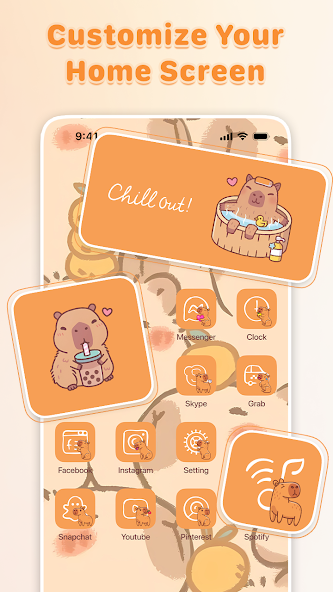
Themes - Wallpapers & Widgets is an innovative application designed for users who want to personalize their devices extensively. This app introduces a plethora of customizable themes that can transform the look and feel of smartphones and tablets alike. With a wide selection of wallpapers, icons, and widgets, Themes empowers users to express their personalities and style while giving their devices a fresh and updated aesthetic. The easy-to-navigate interface allows both novices and experts to create a personalized home screen that reflects their vibes. Users can experiment with various designs and color schemes, ensuring that their device truly feels unique to them.
- Extensive Theme Library: The app boasts a vast library of themes tailored for different tastes and occasions, allowing users to switch aesthetics based on their mood or season.
- Easy Customization: Customization tools are user-friendly, enabling even the least tech-savvy individuals to effortlessly modify their device's appearance.
- Regular Updates: Themes constantly refresh their selection with new images, icons, and widgets, keeping the content exciting and up-to-date.
SLEEK WALLPAPERS FOR EVERY OCCASION
One of the standout features of the Themes - Wallpapers & Widgets application is its impressive collection of wallpapers. The app offers a diverse range of high-resolution images that span various genres including nature, architecture, abstract designs, and pop culture. Users can easily scroll through categories to find the perfect backdrop for their device screen, ensuring that their home screen is always engaging. The wallpapers are regularly updated to reflect current trends, seasonal changes, and holidays, giving users new options to choose from. This feature enables individuals to decorate their screens in a way that resonates with their personal aesthetics.
- High-Resolution Images: All wallpapers are designed for high-definition devices, importing stunning visuals that enhance the overall display quality.
- Dynamic Wallpapers: The app includes animated wallpapers, adding an energetic vibe that stands out compared to static images.
- Seasonal Themes: With frequent updates, users can find themes that celebrate holidays or seasonal changes, keeping their screens fresh year-round.
ENGAGING WIDGETS FOR ENHANCED FUNCTIONALITY
Themes - Wallpapers & Widgets does not just stop at aesthetic upgrades; it enhances user experience with functional widgets. The app includes a variety of widgets ranging from weather updates to calendar events and music players. These widgets are customizable in appearance, letting users adjust their size, style, and information displayed on their home screens. Furthermore, the seamless integration of widgets within the chosen themes fosters a cohesive look that enhances overall usability. This dual-functionality ensures that users have both practical tools and beautiful designs on their devices.
- Customizable Sizes: Users can resize widgets to fit their layout preferences, making it easier to manage limited screen space effectively.
- Variety of Options: From countdown timers to battery indicators, the app includes a multitude of widget types that cater to various user needs.
- Personalization Features: Widget designs can be altered to match overall themes, ensuring that functionality doesn’t compromise aesthetic appeal.
USER-FRIENDLY INTERFACE FOR EFFORTLESS NAVIGATION
One of the critical selling points of the Themes - Wallpapers & Widgets app is its user-friendly interface. The layout is intuitively designed to ensure that users can find what they are looking for with minimal effort. Categories are clearly defined, and searching for specific themes or wallpapers is a breeze thanks to the app's efficient search functionality. Furthermore, the smooth transitions and responsive design enhance user experience, making personalization not only easy but enjoyable. Users can swiftly navigate through the app, making adjustments to their screens without feeling overwhelmed or confused.
- Intuitive Layout: The app’s layout is designed for easy navigation, with categories and sections logically organized for quick access.
- Search Functionality: Users can quickly locate their desired themes or wallpapers through a built-in search bar, saving time and effort.
- Responsive Design: The app responds quickly to user inputs, ensuring seamless transition between selections and real-time previews of theme changes.
COMMUNITY DRIVEN CONTENT AND INTERACTIONS
Themes - Wallpapers & Widgets understands the importance of community in app engagement. The app has integrated features that allow users to share their custom themes and layouts with one another. Community galleries showcase various user designs, offering inspiration for those seeking fresh ideas. Additionally, users can rate and comment on themes, creating a vibrant community where feedback is encouraged. This feature not only enriches the user experience but also fosters creativity among users as they share their artistic expressions.
- Community Galleries: Users can explore collections of themes and wallpapers developed by others, promoting sharing of ideas and inspiration.
- Rating System: The built-in rating system allows users to provide feedback on their favorite themes, helping others make informed choices.
- Collaborative Creativity: Users can connect over style preferences, enhancing their experience through community interactions and suggestions.
The themes of wallpapers and widgets play a significant role in personalizing user experiences across devices. Wallpapers serve as a visual canvas, reflecting individuality, mood, and lifestyle. Whether a serene landscape, an abstract design, or a favorite character, they set the tone for interaction. The choice of wallpaper can evoke emotions, influence productivity, or provide inspiration, making it a fundamental aspect of digital personalization.Widgets, on the other hand, enhance functionality by providing quick access to vital information and tools directly on the home screen. Their interactive nature allows users to customize their interfaces according to their preferences and needs. Widgets can display weather updates, calendar events, or news feeds, transforming static screens into dynamic hubs of information. This combination of aesthetics and functionality is crucial in the modern digital landscape, where efficiency and personalization are highly valued.In conclusion, the interplay of wallpapers and widgets exemplifies the balance between beauty and utility in personal technology. By allowing users to express themselves while simultaneously enhancing their interaction with devices, these elements contribute to a richer, more engaging digital experience. The evolving trends in design and technology will continue to shape how wallpapers and widgets influence our daily interactions with devices.

Top Features of Themes - Wallpapers & Widgets Mod APK
- Customizable Themes Personalize your device with a wide variety of themes that reflect your unique style. Choose from a selection of vibrant colors, patterns, and designs to create a look that matches your mood and preferences.
- Dynamic Wallpapers Elevate your home screen with dynamic wallpapers that come to life. Enjoy animated backgrounds that create an engaging visual experience, making your device more appealing every time you unlock it.
- Interactive Widgets Stay organized and informed with interactive widgets that provide essential information at a glance. From weather updates to calendar events, these widgets enhance functionality while seamlessly blending into your theme.
- User-Friendly Interface Navigate through the app effortlessly with its simple and intuitive design. The user-friendly interface allows you to easily find, apply, and customize wallpapers and widgets without any hassle, ensuring a smooth experience.
- Regular Updates Stay fresh with regular updates that introduce new themes and wallpapers. The app continuously expands its library, providing users with exciting options to keep their devices looking trendy and modern.
- High-Quality Visuals Enjoy stunning visuals crafted with high-resolution graphics. Each wallpaper is designed to ensure clarity and vibrancy, making your screen come alive with beautiful imagery that enhances your device's overall appearance.

Requirements to Install Themes - Wallpapers & Widgets
- Operating System: 4.1 and up or higher
- RAM Required: Minimum 1 GB
- Storage Required: 51 MB
- Internet Required: An active internet
Additional Recommendations
- Storage Space: At least 51 MB of free
- Internet Connection: Stable Wi-Fi or mobile data
- Account: no needed
Step-by-Step Guide to Installing Themes - Wallpapers & Widgets Mod APK
- Step 1: Enable "Install Unknown Apps" (or "Unknown Sources")
- Step 2: Download Themes - Wallpapers & Widgets Mod APK File from HappyMod.net
- Step 3: Locate the Downloaded APK File
- Step 4: Install Themes - Wallpapers & Widgets Mod APK File
- Step 5: Launch the App
Additional tips for Themes - Wallpapers & Widgets Mod APK
Clear Cache Regularly: If Themes - Wallpapers & Widgets starts to feel sluggish or behave unexpectedly, try clearing its cache. Go to Settings > Apps > Themes - Wallpapers & Widgets > Storage & cache, then tap "Clear cache." This often resolves minor performance hiccups without losing your data. Free Up Storage: Ensure your device has sufficient free internal storage. Low storage can significantly impact Themes - Wallpapers & Widgets's performance and even prevent updates or proper functioning. Close Background Apps: If you're experiencing lag, try closing other heavy apps running in the background. This frees up RAM for Themes - Wallpapers & Widgets to run more smoothly.

Conclusion
The themes of wallpapers and widgets play a significant role in personalizing user experiences across devices. Wallpapers serve as a visual canvas, reflecting individuality, mood, and lifestyle. Whether a serene landscape, an abstract design, or a favorite character, they set the tone for interaction. The choice of wallpaper can evoke emotions, influence productivity, or provide inspiration, making it a fundamental aspect of digital personalization.Widgets, on the other hand, enhance functionality by providing quick access to vital information and tools directly on the home screen. Their interactive nature allows users to customize their interfaces according to their preferences and needs. Widgets can display weather updates, calendar events, or news feeds, transforming static screens into dynamic hubs of information. This combination of aesthetics and functionality is crucial in the modern digital landscape, where efficiency and personalization are highly valued.In conclusion, the interplay of wallpapers and widgets exemplifies the balance between beauty and utility in personal technology. By allowing users to express themselves while simultaneously enhancing their interaction with devices, these elements contribute to a richer, more engaging digital experience. The evolving trends in design and technology will continue to shape how wallpapers and widgets influence our daily interactions with devices.
FAQS-FREQUENTLY ASK QUESTION
How do I change the wallpapers in the app?
To change the wallpapers, open the app, browse through the available collections, and select your desired wallpaper. Tap on the 'Set as Wallpaper' button, then choose whether to apply it to the home screen, lock screen, or both.
Can I customize the widgets provided in the app?
Yes, you can customize the widgets. After adding a widget to your home screen, long-press it to access customization options. You can adjust settings like size, appearance, and displayed information according to your preferences.
How do I find specific themes or wallpapers?
To find specific themes or wallpapers, use the search function in the app. Enter keywords related to your interest, and the app will present relevant results. You can also browse through categories for more options.
Can I save favorite wallpapers or themes for later?
Yes, you can save your favorite wallpapers or themes. Simply tap the heart icon or 'Favorite' button when viewing an item. You can later access your saved favorites in the designated section within the app.
How do I create a custom theme using my photos?
Creating a custom theme with your photos is easy. Follow these steps: 1. Open the app and navigate to the ‘Custom Theme’ option. 2. Select ‘Add Photo’ to upload images from your gallery. 3. Adjust the layout and design settings as desired. 4. Save and apply the theme to see it in action.
![Elite Auto Brazil - Wheelie Mod Apk [Unlimited money]](https://i.git99.com/upload/android/icon/2025/08/08/50f54ef505d7916b6c777ed4c915617d.webp)
![Motivation - Daily quotes Mod Apk [Unlocked][Premium]](https://i.git99.com/upload/android/icon/2023/12/14/e56527b2371bcda6768f230a1a1c8e75.webp)
![Music Ringtones for Android Mod Apk [Unlocked][Pro]](https://i.git99.com/upload/android/icon/2026/04/03/d311fe628d7bcf7718a4c5a0355822f5.webp)
![RS Boxing Champions Mod Apk [Unlimited money]](https://i.git99.com/upload/android/icon/2024/01/17/01805e4853e98fe79cef323b2ddd322d.webp)
![City Island 6: Building Town Mod Apk [Unlimited money]](https://i.git99.com/upload/android/icon/2026/03/10/47eb58c37b68212cf651e0be82ce784c.webp)
![Symfonium: Music player & cast Mod Apk [Unlocked][Premium]](https://i.git99.com/upload/android/icon/2026/03/16/7cccd9423b66fe0c51f93e0dcd5004a4.webp)
![ARK: Ultimate Mobile Edition Mod Apk [Unlocked]](https://i.git99.com/upload/android/icon/2025/01/06/810c37317641c5c026793e623f92b68a.webp)
![Age of Magic: Turn Based RPG Mod Apk [High Damage][Invincible]](https://i.git99.com/upload/android/icon/2026/06/01/e250b34c6a7654f94a9654e5a8856516.webp)
1.Rate
2.Comment
3.Name
4.Email