 HappyMod.net

| Name | Remini - AI Photo Enhancer |
| Publisher | bending spoons |
| Size | 105.05 MB |
| Latest version | 3.7.3215.202576940 |
| Released on | Jun 4, 2026 |
| Minimum Requirement | 6.0 and up |
| Get it on | Google Play |
| Languages | EN,FR,DE,ID,IT,JA,KO,PT,RU,ZH,ES,TH,ZH,TR,VI |
Table of Contents
UNLEASH THE POWER OF PHOTO ENHANCEMENT WITH REMINI
Remini - AI Photo Enhancer is designed for those who cherish their memories captured in photographs and seek to enhance them to their fullest potential. Utilizing sophisticated artificial intelligence technology, Remini focuses on improving old and low-resolution images to vibrant, high-definition masterpieces. The app's unique algorithms analyze and reconstruct images, enhancing clarity while preserving the essence and character of the original photos. Whether you’re looking to restore cherished family memories, improve travel snapshots, or enhance portraits, Remini offers user-friendly tools to transform your images effortlessly. With just a few taps, users can turn faded or pixelated photographs into stunning visuals, making memories feel fresh and alive once again.
- AI-Powered Technology: The app utilizes advanced AI algorithms to analyze images and enhance clarity, sharpness, and overall quality, delivering exceptional results with minimal user input.
- User-Friendly Interface: Designed with simplicity in mind, Remini allows users of all skill levels to easily navigate and utilize the enhancement features, making it accessible for everyone.
- Quick Processing Speed: Thanks to its efficient technology, image processing and enhancement are completed within seconds, ensuring a fast and seamless user experience for immediate outputs.
RESTORE YOUR FAVORITE MEMORIES WITH REMINI'S OLD PHOTO RESTORATION
One of Remini's most compelling features is its ability to restore and rejuvenate old photographs that may have succumbed to the tests of time. Users can upload vintage images that have faded, become scratched, or lost detail over the years, and watch as the app revitalizes them. The restoration process involves removing blemishes, enhancing colors, and reconstructing missing details to produce a photo that closely resembles its original beauty. This feature is particularly popular among users looking to preserve family heritage and historical records, allowing past moments to live on in high detail and clarity. Furthermore, the emotional impact of re-engaging with these memories in a revitalized state adds another layer of value to the photos enhanced by Remini.
- Detail Restoration: Remini's algorithms focus on recovering intricate details that may have been lost in older prints, enabling a more authentic and rich visual representation of your cherished memories.
- Color Enhancement: The app's intelligent color enhancement capabilities breathe new life into faded hues, ensuring that old photographs look as vibrant as they did on the day they were taken.
- Easy Sharing Options: After enhancing, users can easily share their restored images with friends and family directly through social media platforms, ensuring memories are celebrated together.
SIMPLIFY YOUR SELFIES WITH REMINI'S BEAUTIFICATION TOOLS
For selfie enthusiasts and those who enjoy capturing their best angles, Remini provides a suite of beautification tools aimed at enhancing portraits. The app can smooth skin, brighten eyes, and refine facial features, allowing users to present their best selves. This feature is particularly appealing in today's social media age, where individuals often seek to curate a polished online presence. Remini makes it easy to touch up images without the need for complex photo editing skills, providing results that maintain a natural look while enhancing beauty. Users can also enhance background blurriness to draw focus to the subject, creating professional-like portraits with just a few clicks.
- Skin Smoothing Effect: This tool subtly smooths skin textures while preserving essential details, creating a flawless complexion that looks natural and inviting.
- Eye Brightening: By automatically enhancing eye brightness and sharpness, users convey a sense of energy and liveliness in their portraits, making the focus pop.
- Background Blur Feature: This creative option helps to isolate the subject by applying a professional background blur effect, providing depth and artistic flair to selfies.
EXPLORE THE POWER OF AI WITH REMINI'S ANIME AND CARTOON TRANSFORMATION
In addition to enhancing traditional images, Remini also caters to creativity with its unique anime and cartoon transformation feature. Users can upload any regular photo and watch as Remini reimagines it in a playful, anime-inspired style. This feature has become a favorite among users who are eager to experiment and embrace artistic interpretations of their images. It's an outstanding way to have fun with photos, whether for personal use or social media sharing. The conversions maintain a high standard of quality while offering a sense of whimsy and creativity that resonates with a wide range of users. It introduces a playful twist to photography, inviting artistic exploration.
- Artistic Conversion: Users can transform their photographs into vibrant and colorful anime-style illustrations, making their images stand out in a fun and artistic way.
- Personalized Styles: The app offers different anime and cartoon styles, allowing users to choose the aesthetic that best matches their personality or preferences.
- Instant Sharing: With just a few taps, transformed images can be shared on various platforms, helping users to express their creativity and uniqueness in visual content.
EXPERIENCE THE SOCIAL GALLERY WITH REMINI COMMUNITY
Remini isn't just about personal enhancement; it also offers a vibrant community feature where users can share their enhanced photos and view others' works. This social aspect provides a platform for users to showcase their creativity, get inspired by others, and engage in a community of like-minded photography enthusiasts. Users can follow each other, comment on images, and gain recognition for their enhancements, creating an interactive experience that goes beyond individual use. The Remini Community encourages interaction and feedback, fostering an environment where creativity and artistry can flourish. This unique feature places Remini apart, turning a simple photo enhancement tool into a collaborative space for creative expression.
- Share and Showcase: Users can upload their enhanced images, allowing others to appreciate their work and inspire new creative directions within the community.
- Follow Other Users: The ability to follow other photographers allows users to keep up with favorite artists and their latest creations, building a network of inspiration.
- Interactive Feedback: The community aspect promotes discussions where users can offer constructive feedback, enhancing the overall experience and skill development.
Remini – AI Photo Enhancer has significantly transformed the way individuals enhance and restore their photographs. With advanced AI algorithms, it efficiently improves the quality of images, making them sharper and more vibrant. Users can easily revitalize old or low-quality photos by transforming them into high-definition images that showcase finer details and a richer color palette.The user-friendly interface allows even those with minimal technical skills to navigate the app seamlessly. The ability to enhance facial features, remove imperfections, and create clearer images results in a highly satisfying user experience. Whether for personal use, professional projects, or preserving cherished memories, Remini meets diverse needs with impressive results.Moreover, the ongoing updates and enhancements signify that the developers remain committed to refining the application, ensuring that it stays at the forefront of photo enhancement technology. Users have reported a high level of satisfaction, often marveling at the dramatic transformations possible within seconds. The combination of ease of use, effective results, and continual improvements makes Remini – AI Photo Enhancer a standout tool for anyone looking to elevate their photography, breathe new life into cherished memories, or explore creative possibilities in image enhancement.
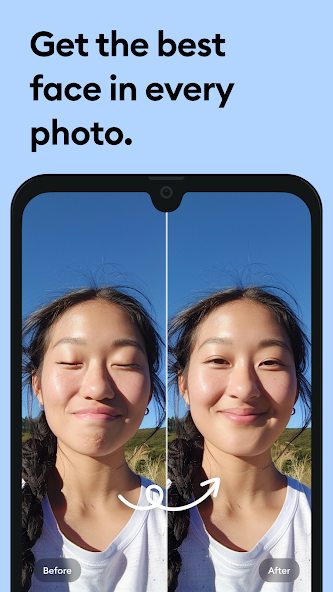
Top Features of Remini - AI Photo Enhancer Mod APK
- AI-Powered Enhancement Remini employs advanced artificial intelligence algorithms to automatically enhance your photos, improving clarity, detail, and overall quality with just one tap. This cutting-edge technology transforms your images into stunning visuals, making every picture frame-worthy.
- Restoration of Old Photos Bring your cherished memories back to life by restoring old and damaged photos. Remini expertly repairs imperfections, such as scratches and fading, and enhances colors, ensuring your vintage images are as vibrant as the day they were captured.
- Resolution Upgrading With Remini, you can easily upscale low-resolution images, converting them into high-definition masterpieces. This feature enhances the sharpness and detail of your photos, making them perfect for prints and digital displays.
- Background Blur Effect Create professional-looking portraits by using the background blur feature. Remini intelligently separates subjects from their backgrounds, allowing you to focus on the main subject while softening the surrounding scene, enhancing visual appeal.
- Instant Sharing Options Easily share your newly enhanced photos across social media platforms directly from the app. Remini simplifies the process, allowing you to showcase your improved images to friends and followers in just a few clicks.
- User-Friendly Interface Designed with ease of use in mind, Remini features a simple and intuitive interface that allows users of all skill levels to enhance their photos effortlessly. Navigate through the app seamlessly and access powerful tools with just a few taps.

Requirements to Install Remini - AI Photo Enhancer
- Operating System: 6.0 and up or higher
- RAM Required: Minimum 1 GB
- Storage Required: 210 MB
- Internet Required: An active internet
Additional Recommendations
- Storage Space: At least 210 MB of free
- Internet Connection: Stable Wi-Fi or mobile data
- Account: no needed
Step-by-Step Guide to Installing Remini - AI Photo Enhancer Mod APK
- Step 1: Enable "Install Unknown Apps" (or "Unknown Sources")
- Step 2: Download Remini - AI Photo Enhancer Mod APK File from HappyMod.net
- Step 3: Locate the Downloaded APK File
- Step 4: Install Remini - AI Photo Enhancer Mod APK File
- Step 5: Launch the App
Additional tips for Remini - AI Photo Enhancer Mod APK
Clear Cache Regularly: If Remini - AI Photo Enhancer starts to feel sluggish or behave unexpectedly, try clearing its cache. Go to Settings > Apps > Remini - AI Photo Enhancer > Storage & cache, then tap "Clear cache." This often resolves minor performance hiccups without losing your data. Free Up Storage: Ensure your device has sufficient free internal storage. Low storage can significantly impact Remini - AI Photo Enhancer's performance and even prevent updates or proper functioning. Close Background Apps: If you're experiencing lag, try closing other heavy apps running in the background. This frees up RAM for Remini - AI Photo Enhancer to run more smoothly.

Conclusion
Remini – AI Photo Enhancer has significantly transformed the way individuals enhance and restore their photographs. With advanced AI algorithms, it efficiently improves the quality of images, making them sharper and more vibrant. Users can easily revitalize old or low-quality photos by transforming them into high-definition images that showcase finer details and a richer color palette.The user-friendly interface allows even those with minimal technical skills to navigate the app seamlessly. The ability to enhance facial features, remove imperfections, and create clearer images results in a highly satisfying user experience. Whether for personal use, professional projects, or preserving cherished memories, Remini meets diverse needs with impressive results.Moreover, the ongoing updates and enhancements signify that the developers remain committed to refining the application, ensuring that it stays at the forefront of photo enhancement technology. Users have reported a high level of satisfaction, often marveling at the dramatic transformations possible within seconds. The combination of ease of use, effective results, and continual improvements makes Remini – AI Photo Enhancer a standout tool for anyone looking to elevate their photography, breathe new life into cherished memories, or explore creative possibilities in image enhancement.

FAQS-FREQUENTLY ASK QUESTION
What types of photos can I enhance using Remini?
You can enhance various types of photos including portraits, landscapes, old photos, and low-resolution images. The app is designed to improve clarity and detail in almost any image you upload.
How does the AI enhancement process work?
The app uses advanced AI algorithms to analyze your photo, detect facial features, and add details to enhance resolution and clarity. It intelligently reconstructs parts of images for a remarkable improvement.
Can I enhance video footage with Remini?
No, Remini is designed specifically for photo enhancement only. It currently does not support video enhancement, so make sure to focus on enhancing still images for the best results.
How can I enhance an old or damaged photo?
To enhance an old or damaged photo, follow these steps: 1. Open the app and select 'Enhance'. 2. Upload the old photo you want to improve. 3. Adjust any settings if prompted, then tap 'Start'. 4. Review the enhanced image and save it.
What should I do if my enhanced photo doesn't look as expected?
If the enhanced photo doesn't meet your expectations, consider re-uploading and experimenting with different photos or settings. Sometimes different images yield better results, as the AI's effectiveness can vary based on the original quality.
![Elite Auto Brazil - Wheelie Mod Apk [Unlimited money]](https://i.git99.com/upload/android/icon/2025/08/08/50f54ef505d7916b6c777ed4c915617d.webp)
![Motivation - Daily quotes Mod Apk [Unlocked][Premium]](https://i.git99.com/upload/android/icon/2023/12/14/e56527b2371bcda6768f230a1a1c8e75.webp)
![Music Ringtones for Android Mod Apk [Unlocked][Pro]](https://i.git99.com/upload/android/icon/2026/04/03/d311fe628d7bcf7718a4c5a0355822f5.webp)
![RS Boxing Champions Mod Apk [Unlimited money]](https://i.git99.com/upload/android/icon/2024/01/17/01805e4853e98fe79cef323b2ddd322d.webp)
![City Island 6: Building Town Mod Apk [Unlimited money]](https://i.git99.com/upload/android/icon/2026/03/10/47eb58c37b68212cf651e0be82ce784c.webp)
![Symfonium: Music player & cast Mod Apk [Unlocked][Premium]](https://i.git99.com/upload/android/icon/2026/03/16/7cccd9423b66fe0c51f93e0dcd5004a4.webp)
![ARK: Ultimate Mobile Edition Mod Apk [Unlocked]](https://i.git99.com/upload/android/icon/2025/01/06/810c37317641c5c026793e623f92b68a.webp)
![Age of Magic: Turn Based RPG Mod Apk [High Damage][Invincible]](https://i.git99.com/upload/android/icon/2026/06/01/e250b34c6a7654f94a9654e5a8856516.webp)
1.Rate
2.Comment
3.Name
4.Email