 HappyMod.net
| Name | Panels - sidebar launcher |
| Publisher | fossor coding |
| Size | 5.71 MB |
| Latest version | 1.594 |
| Released on | Jan 16, 2026 |
| Minimum Requirement | 7.0 and up |
| Get it on | Google Play |
| Languages | EN,FR,DE,ID,IT,JA,KO,PT,RU,ZH,ES,TH,ZH,TR,VI |
Table of Contents
UNLEASH YOUR CREATIVITY WITH PANELS - SIDEBAR LAUNCHER
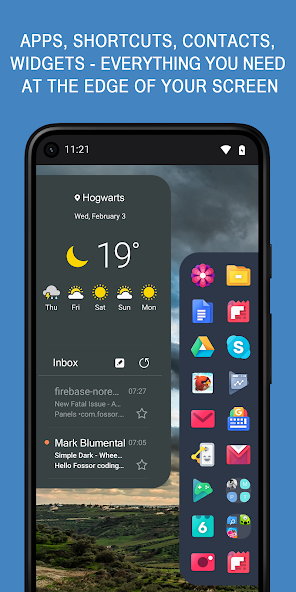
Panels - Sidebar Launcher is a uniquely designed application that transforms the way users interact with their mobile devices. By providing a seamless and customizable sidebar interface, this application allows users to access their favorite apps, contacts, and tools without disrupting their workflow. The sidebar can be activated from any screen, enabling quick access to frequently used functions. Whether you are multitasking or simply looking to enhance your productivity, Panels provides an intuitive solution tailored to individual preferences. It features an array of customization options, allowing users to alter colors, styles, and the arrangement of icons to suit their aesthetic. With Panels, you can ensure that your most important tools and applications are just a swipe away, streamlining your mobile experience like never before.
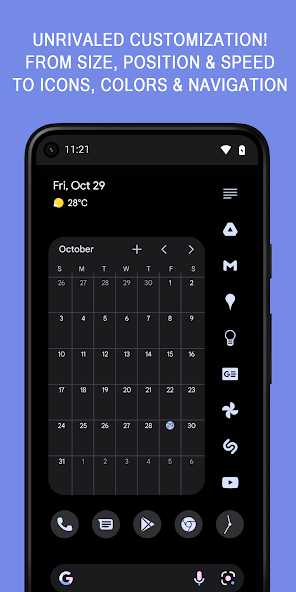
- Customizable Interface: Users can personalize the sidebar with various themes and styles. This means that whether you prefer a minimalist look or a more vibrant interface, Panels has options that cater to different tastes.
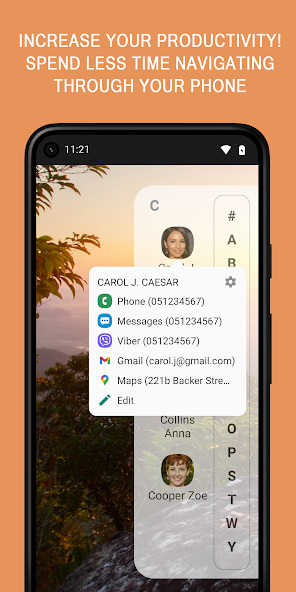
- Quick Access to Apps and Contacts: The sidebar launcher allows users to set their most frequently used applications and contacts for easy access, significantly reducing the time spent navigating through screens.
- Multitasking Capabilities: With Panels, you can easily switch between apps without needing to close or minimize your current task. This feature enhances productivity by allowing for smooth transitions during work.
ENHANCE PRODUCTIVITY WITH EFFORTLESS NAVIGATION
The Panels - Sidebar Launcher excels at boosting productivity through its innovative design that prioritizes effortless navigation. One of the primary challenges in mobile device usage is the time-consuming process of searching for apps and features buried within multiple menus. Panels eliminates this hassle by establishing a sidebar that is always easily accessible. Simply swipe from the edge of the screen, and the sidebar emerges, revealing tiles for your apps, contacts, and widgets. This intuitive feature means that users can remain focused on their tasks while having everything they need within arm's reach. Additionally, the finesse of the sidebar layout encourages users to organize their tools in a way that reflects their routines, enhancing efficiency throughout the day.
- Instant Access: No more scrolling through endless app pages, as Panels allows immediate access to your most-used items from any screen, saving valuable time.
- Arrangement Options: Users can organize the sidebar as they wish, creating sections or categories for different types of apps, leading to a more structured experience.
- Widget Support: The sidebar can also accommodate widgets, further enhancing usability by allowing users to view vital information (like weather updates or calendar events) at a glance.
SEAMLESS INTEGRATION WITH OTHER APPS AND SERVICES
Panels - Sidebar Launcher is designed to seamlessly integrate with other applications and services on your device. This feature vastly expands the functionality of the launcher, making it not just a mere app organizer but a central hub for productivity. Users can easily access social media, messaging platforms, productivity tools, and any other essential applications without needing to switch screens multiple times. This integration ensures that your mobile experience remains fluid and efficient, thus allowing you to maintain your focus on tasks at hand. Furthermore, Panda's integrations can be tailored according to user preferences, ensuring that each individual can create a personalized ecosystem that resonates with their needs.
- Support for Popular Applications: Panels supports direct links to many popular applications, making it a versatile tool that caters to diverse user inclinations.
- Quick Messaging Access: By integrating messaging apps into the sidebar, users can respond to messages promptly without leaving their current activity, which is critical for effective communication.
- Enhanced Workflow: With integration capabilities, users can quickly switch between personal and professional tasks, maintaining a balanced workflow throughout their day.
AUNTHENTIC USER EXPERIENCE THROUGH INTUITIVE DESIGN
The Panels - Sidebar Launcher is crafted to provide an authentic user experience through its intuitive design. The sleek yet functional layout emphasizes ease of use, ensuring that users, regardless of technical proficiency, can navigate the app with minimal learning curve. The sidebar itself can be customized to match the user's hand orientation and left or right-handed preferences, ensuring comfort during usage. This user-centric approach not only enhances engagement but also increases satisfaction levels, as users find themselves acclimating to the launcher quickly. By focusing on providing a realistic and relatable interface, Panels revolutionizes how individuals interact with their mobile devices.
- User-Friendly Interface: The layout is designed to be straightforward, promoting ease of use while minimizing frustration, which is essential for user retention.
- Adaptive Size: The sidebar can be resized according to user preference, allowing for a customized experience that suits every individual's hand size and usage style.
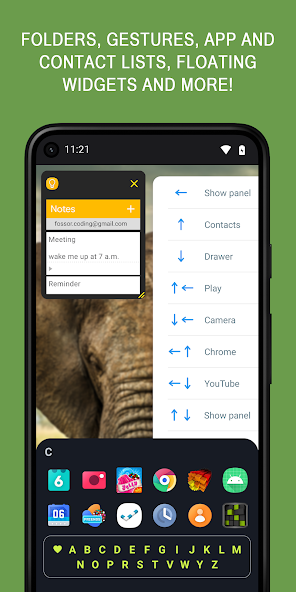
- Gesture Support: Users can activate the sidebar using gestures, making it a practical and modern solution for launching apps that fits with contemporary mobile interaction trends.
UPDATE YOUR TECH EXPERIENCE WITH REGULAR UPDATES AND SUPPORT
Panels - Sidebar Launcher is committed to providing an exceptional user experience through regular updates and customer support. The development team actively seeks user feedback to refine features and introduce new ones consistently. This dedication to improvement means users can expect new functionalities that align with the ever-evolving landscape of mobile technology. Furthermore, with a responsive support team, any issues or queries that arise can be addressed promptly, ensuring that users feel supported throughout their journey. The commitment to ongoing development and user satisfaction truly sets Panels apart as a leading mobile application in the sidebar launcher category.
- Frequent Updates: Regularly scheduled updates introduce new features, improvements, and essential bug fixes, keeping the app optimized for performance.
- User Feedback Implementation: The development team values user feedback and incorporates suggestions whenever possible, creating a product that evolves in line with audience needs.
- Dedicated Support Team: A responsive support team is available to assist with any inquiries or technical issues, enhancing the overall user experience and fostering a loyal user base.
The conclusion of the Panels sidebar launcher underscores its significant role in enhancing user interaction and accessibility within applications. This feature acts as a pivotal bridge, allowing users to efficiently navigate through various functionalities while maintaining a clean and organized interface. By offering a streamlined approach to manage different panels, users experience less clutter and more focused engagement with tools and information.Moreover, the sidebar launcher contributes to improved productivity as users can swiftly access critical features without the need for disruptive transitions or excessive clicks. This efficiency is particularly beneficial in complex applications where quick access to various tools can save valuable time and enhance user satisfaction.Furthermore, the implementation of a customizable sidebar allows users to tailor their experience according to individual preferences, making the interface more intuitive and user-friendly. This adaptability not only caters to seasoned experts seeking advanced functionalities but also supports novice users in familiarizing themselves with the application’s features at their own pace.In summary, the Panels sidebar launcher significantly boosts usability through enhanced navigation, efficiency, and personalization. Its thoughtful design fosters a more engaging and productive user experience, making it an indispensable element in modern application interfaces.
Top Features of Panels - sidebar launcher Mod APK
- User-Friendly Interface Experience a clean and intuitive layout that allows users to easily navigate through the sidebar launcher. The simple design ensures quick access to your favorite apps and settings without unnecessary clutter, enhancing your overall mobile experience.
- Customizable Shortcuts Personalize your sidebar by adding shortcuts to the apps and functions you use most. This customization feature empowers users to optimize their workflow and access tools efficiently, tailoring the sidebar to fit their unique needs.
- Efficient Multitasking Effortlessly switch between applications with the multitasking capabilities of the sidebar launcher. Quickly access multiple apps without navigating through the home screen, allowing you to enhance productivity and manage tasks with ease.
- Theme Options Choose from a variety of themes to give the sidebar a fresh look that suits your style. With customizable colors and designs, users can transform the appearance of the launcher to create a personalized aesthetic for their device.
- Gesture Controls Utilize gesture controls to open the sidebar quickly with simple swipes or taps. These intuitive gestures promote ease of access and navigation, making it faster to utilize important features without interrupting your flow.
- Lightweight Performance Enjoy a lightweight app that runs smoothly without draining your device’s resources. The sidebar launcher is designed for efficiency, ensuring fast performance and responsiveness even on devices with limited specifications.
Requirements to Install Panels - sidebar launcher
- Operating System: 7.0 and up or higher
- RAM Required: Minimum 1 GB
- Storage Required: 11 MB
- Internet Required: An active internet
Additional Recommendations
- Storage Space: At least 11 MB of free
- Internet Connection: Stable Wi-Fi or mobile data
- Account: no needed
Step-by-Step Guide to Installing Panels - sidebar launcher Mod APK
- Step 1: Enable "Install Unknown Apps" (or "Unknown Sources")
- Step 2: Download Panels - sidebar launcher Mod APK File from HappyMod.net
- Step 3: Locate the Downloaded APK File
- Step 4: Install Panels - sidebar launcher Mod APK File
- Step 5: Launch the App
Additional tips for Panels - sidebar launcher Mod APK
Clear Cache Regularly: If Panels - sidebar launcher starts to feel sluggish or behave unexpectedly, try clearing its cache. Go to Settings > Apps > Panels - sidebar launcher > Storage & cache, then tap "Clear cache." This often resolves minor performance hiccups without losing your data. Free Up Storage: Ensure your device has sufficient free internal storage. Low storage can significantly impact Panels - sidebar launcher's performance and even prevent updates or proper functioning. Close Background Apps: If you're experiencing lag, try closing other heavy apps running in the background. This frees up RAM for Panels - sidebar launcher to run more smoothly.
Conclusion
The conclusion of the Panels sidebar launcher underscores its significant role in enhancing user interaction and accessibility within applications. This feature acts as a pivotal bridge, allowing users to efficiently navigate through various functionalities while maintaining a clean and organized interface. By offering a streamlined approach to manage different panels, users experience less clutter and more focused engagement with tools and information.Moreover, the sidebar launcher contributes to improved productivity as users can swiftly access critical features without the need for disruptive transitions or excessive clicks. This efficiency is particularly beneficial in complex applications where quick access to various tools can save valuable time and enhance user satisfaction.Furthermore, the implementation of a customizable sidebar allows users to tailor their experience according to individual preferences, making the interface more intuitive and user-friendly. This adaptability not only caters to seasoned experts seeking advanced functionalities but also supports novice users in familiarizing themselves with the application’s features at their own pace.In summary, the Panels sidebar launcher significantly boosts usability through enhanced navigation, efficiency, and personalization. Its thoughtful design fosters a more engaging and productive user experience, making it an indispensable element in modern application interfaces.
FAQS-FREQUENTLY ASK QUESTION
How do I customize my sidebar in Panels?
To customize your sidebar in Panels, open the app, go to the settings, and select 'Sidebar Settings'. Here, you can add or remove apps, change the appearance, and adjust the size of the sidebar.
Can I add widgets to my sidebar?
Yes, you can add widgets to your sidebar. Just open the 'Widgets' tab in the sidebar settings, select the widgets you want, and drag them into your desired area within the sidebar for easy access.
How do I manage app shortcuts on the sidebar?
To manage app shortcuts, access the sidebar settings, go to 'App Shortcuts', and either drag apps from the list to the sidebar or remove existing ones by tapping the delete icon next to them.
How do I change the sidebar's appearance?
To change the sidebar's appearance, navigate to 'Appearance' in the sidebar settings. You can modify colors, transparency, and size to match your preferences and enhance usability based on your device's layout.
What steps should I follow to reorganize my sidebar layout?
To reorganize your sidebar layout, follow these steps: 1. Open Panels app. 2. Access 'Sidebar Settings'. 3. Go to 'Arrange Icons'. 4. Drag and drop the icons in your preferred order. 5. Save changes.
![Elite Auto Brazil - Wheelie Mod Apk [Unlimited money]](https://i.git99.com/upload/android/icon/2025/08/08/50f54ef505d7916b6c777ed4c915617d.webp)
![Motivation - Daily quotes Mod Apk [Unlocked][Premium]](https://i.git99.com/upload/android/icon/2023/12/14/e56527b2371bcda6768f230a1a1c8e75.webp)
![Music Ringtones for Android Mod Apk [Unlocked][Pro]](https://i.git99.com/upload/android/icon/2026/04/03/d311fe628d7bcf7718a4c5a0355822f5.webp)
![RS Boxing Champions Mod Apk [Unlimited money]](https://i.git99.com/upload/android/icon/2024/01/17/01805e4853e98fe79cef323b2ddd322d.webp)
![City Island 6: Building Town Mod Apk [Unlimited money]](https://i.git99.com/upload/android/icon/2026/03/10/47eb58c37b68212cf651e0be82ce784c.webp)
![Symfonium: Music player & cast Mod Apk [Unlocked][Premium]](https://i.git99.com/upload/android/icon/2026/03/16/7cccd9423b66fe0c51f93e0dcd5004a4.webp)
![ARK: Ultimate Mobile Edition Mod Apk [Unlocked]](https://i.git99.com/upload/android/icon/2025/01/06/810c37317641c5c026793e623f92b68a.webp)
![Age of Magic: Turn Based RPG Mod Apk [High Damage][Invincible]](https://i.git99.com/upload/android/icon/2026/06/01/e250b34c6a7654f94a9654e5a8856516.webp)
1.Rate
2.Comment
3.Name
4.Email