 HappyMod.net
| Name | Dual Space Pro -Multi Accounts |
| Publisher | dualspace |
| Size | 21.63 MB |
| Latest version | 3.1.1 |
| Released on | May 13, 2026 |
| Minimum Requirement | 4.4 and up |
| Get it on | Google Play |
| Languages | EN,FR,DE,ID,IT,JA,KO,PT,RU,ZH,ES,TH,ZH,TR,VI |
Table of Contents
UNLOCK MULTIPLE ACCOUNTS EFFORTLESSLY WITH DUAL SPACE PRO
Dual Space Pro is an innovative application that allows users to create and manage multiple social media or game accounts seamlessly. This powerful tool is designed for users who wish to separate their work and personal lives, or simply for those who need more than one account on platforms like WhatsApp, Facebook, or Instagram. Dual Space Pro simplifies the process of logging into different accounts without the hassle of constantly switching in and out. By isolating apps and their data, this app maintains the privacy and integrity of each account. With its user-friendly interface, opening and managing multiple accounts has never been easier or more efficient.
- Account Isolation: Each account operates independently, preventing any data crossover and ensuring privacy for each user. This is vital for those who manage both personal and professional accounts.
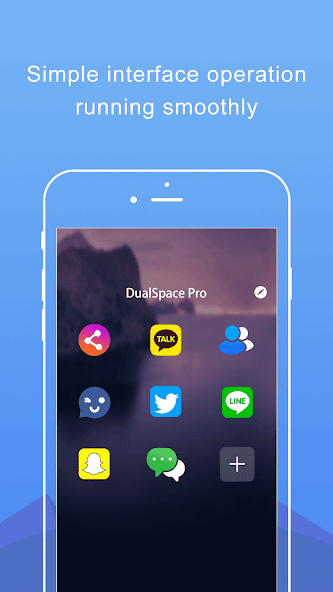
- User-Friendly Interface: The app is designed with simplicity in mind, making navigation easy for all users, whether tech-savvy or not.
- Support for Multiple Apps: Whether you want to run two versions of WhatsApp, Facebook, or gaming accounts, Dual Space Pro supports a wide variety of applications, enhancing user experience.
ENHANCE YOUR GAMING EXPERIENCE WITH DUAL SPACE PRO
For avid gamers, Dual Space Pro opens doors to a whole new world of possibilities. Gamers often find themselves in situations where they want to play a game with multiple accounts to maximize their achievements or to enjoy different gameplay experiences. Dual Space Pro allows for seamless multitasking, enabling players to run two game accounts simultaneously. This feature not only enhances the gaming experience but also adds depth and strategy, as players can switch between accounts to gather resources, trade, or engage in battles. Additionally, the app's functionality supports various popular games, ensuring that players can maximize their potential in the gaming universe.
- Simultaneous Gameplay: The app allows users to run two accounts at the same time, making it easier for gamers to strategize and optimize their gameplay.
- Resource Management: Switch easily between accounts to gather resources or complete missions in different ways, thereby enhancing the overall gaming experience.
- Compatible with Popular Games: Dual Space Pro supports a variety of top games, providing gamers with ample opportunities to explore multiple dimensions of their favorite titles.
SEAMLESS USER EXPERIENCE WITH DUAL SPACE PRO
One of the standout features of Dual Space Pro is its ability to provide a seamless user experience. The app is designed to run smoothly in the background, enabling users to easily switch between their cloned apps without lags or interruptions. This fluid functionality is essential for users who rely on their mobile devices for both personal and professional purposes. Dual Space Pro’s efficient memory management allows for quick access to any of the cloned applications, making multitasking an effortless endeavor. Whether you are responding to work emails or chatting with friends, the transition is swift and efficient, making the app a valuable tool for anyone who juggles multiple accounts.
- Fast Loading Times: Users will appreciate the quick startup and seamless loading of cloned apps, resulting in a hassle-free experience.
- Efficient Memory Utilization: The app is designed to manage memory effectively, ensuring that the device operates smoothly without draining battery life.
- Multiple Cloning Options: Users can clone multiple apps, making it feasible to handle a diverse range of accounts all at once, catering to varied needs.
SECURE YOUR DATA WITH DUAL SPACE PRO
Security is a prime concern for every smartphone user, especially when managing multiple accounts that contain sensitive information. Dual Space Pro places a significant emphasis on data privacy and application security. Users can rest assured knowing that their data is securely isolated within each cloned app. The app employs advanced encryption methods to safeguard personal information, ensuring that no unauthorized access occurs. Additionally, users can enable app locks for enhanced security, providing an extra layer of protection that is crucial in a digitally connected world. Dual Space Pro not only facilitates access to multiple accounts but also prioritizes the safety of each user's information.
- Advanced Encryption: The app utilizes state-of-the-art encryption techniques to guarantee that data remains private and protected from unauthorized access.
- App Lock Feature: Users can activate an app lock for additional security, ensuring that even if someone gains access to their device, their accounts remain secure.
- High Privacy Standards: Dual Space Pro maintains strict privacy policies, defending users’ rights to data protection while providing its versatile functionalities.
PERSONALIZE YOUR EXPERIENCE WITH DUAL SPACE PRO
Customization is a key feature of Dual Space Pro that allows users to tailor their experience according to their preferences. The app enables users to customize the appearance of each cloned app, allowing different interfaces or themes which distinguish between personal and professional accounts. This personalization aspect not only enhances usability but also adds a fun element to managing multiple accounts. Users can choose different icons, change names, or set unique notifications, helping them quickly identify which account to access without confusion. Such features pave the way for a more engaging and personal digital environment, making Dual Space Pro more than just a utility tool but a personalized experience.
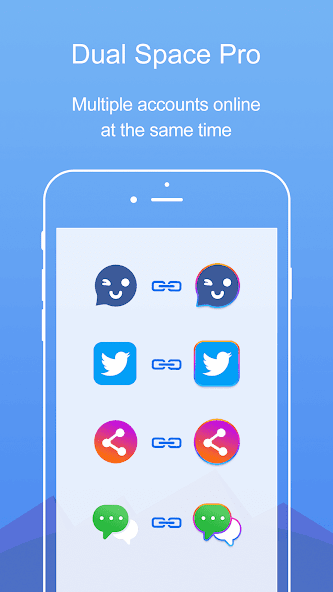
- Custom Icons: Users can change icons for cloned apps, making it easier to recognize accounts at a glance.
- Unique Theme Options: The ability to apply different themes helps distinguish accounts, adding a personal touch to the user interface.
- Notification Customization: Setting unique notifications ensures that users receive timely alerts for each account, helping streamline communications.
Dual Space Pro offers a powerful and effective solution for users seeking to manage multiple accounts on their devices seamlessly. By creating clone applications, it allows users to run two or more instances of the same app simultaneously, which is particularly beneficial for those who juggle personal and professional lives. The user-friendly interface simplifies the process of switching between accounts, eliminating the need for constant log-outs and log-ins, thus saving time and enhancing productivity.Furthermore, the app maintains high levels of privacy and security, ensuring that users can safely manage their various accounts without the risk of data leakage. With its robust functionality, users can customize each cloned app individually, tailoring settings and notifications to suit their needs. This level of customization enhances user experience and allows for better organization of different social, gaming, or work-related accounts.In conclusion, Dual Space Pro stands out as a vital tool for anyone needing to navigate multiple online identities efficiently. Its practicality, ease of use, and emphasis on security make it an essential app for modern digital users. Whether for social media, messaging platforms, or any other app requiring multiple logins, Dual Space Pro is equipped to handle the task with finesse and reliability.
Top Features of Dual Space Pro -Multi Accounts Mod APK
- Multi-Account Support Effortlessly manage multiple social media or gaming accounts on a single device. Dual Space Pro allows you to log in to various accounts simultaneously, making it easier to switch between them without the hassle of logging out and back in again.
- Privacy Protection Enjoy enhanced privacy features that secure your personal information. Dual Space Pro enables you to hide your app icons and protect specific accounts with passwords, ensuring that sensitive data remains safe from prying eyes.
- Clutter-Free Interface Experience a clean and user-friendly interface designed to enhance navigation. The intuitive layout helps you easily manage your multiple accounts, allowing quick access to each one without confusion or delays.
- Data Isolation Keep your data separate with strong isolation features. Dual Space Pro creates a unique environment for each of your accounts, which prevents data leakage between them and enhances overall security.
- Customizable Themes Personalize your apps with various themes and customization options. Dual Space Pro offers a range of styles and designs, allowing users to choose appearances that suit their tastes and preferences.
- Fast Switching Switch between accounts with remarkable speed and efficiency. Dual Space Pro minimizes loading times, enabling users to quickly transition from one account to another, thereby improving productivity and user experience.

Requirements to Install Dual Space Pro -Multi Accounts
- Operating System: 4.4 and up or higher
- RAM Required: Minimum 1 GB
- Storage Required: 43 MB
- Internet Required: An active internet
Additional Recommendations
- Storage Space: At least 43 MB of free
- Internet Connection: Stable Wi-Fi or mobile data
- Account: no needed
Step-by-Step Guide to Installing Dual Space Pro -Multi Accounts Mod APK
- Step 1: Enable "Install Unknown Apps" (or "Unknown Sources")
- Step 2: Download Dual Space Pro -Multi Accounts Mod APK File from HappyMod.net
- Step 3: Locate the Downloaded APK File
- Step 4: Install Dual Space Pro -Multi Accounts Mod APK File
- Step 5: Launch the App
Additional tips for Dual Space Pro -Multi Accounts Mod APK
Clear Cache Regularly: If Dual Space Pro -Multi Accounts starts to feel sluggish or behave unexpectedly, try clearing its cache. Go to Settings > Apps > Dual Space Pro -Multi Accounts > Storage & cache, then tap "Clear cache." This often resolves minor performance hiccups without losing your data. Free Up Storage: Ensure your device has sufficient free internal storage. Low storage can significantly impact Dual Space Pro -Multi Accounts's performance and even prevent updates or proper functioning. Close Background Apps: If you're experiencing lag, try closing other heavy apps running in the background. This frees up RAM for Dual Space Pro -Multi Accounts to run more smoothly.

Conclusion
Dual Space Pro offers a powerful and effective solution for users seeking to manage multiple accounts on their devices seamlessly. By creating clone applications, it allows users to run two or more instances of the same app simultaneously, which is particularly beneficial for those who juggle personal and professional lives. The user-friendly interface simplifies the process of switching between accounts, eliminating the need for constant log-outs and log-ins, thus saving time and enhancing productivity.Furthermore, the app maintains high levels of privacy and security, ensuring that users can safely manage their various accounts without the risk of data leakage. With its robust functionality, users can customize each cloned app individually, tailoring settings and notifications to suit their needs. This level of customization enhances user experience and allows for better organization of different social, gaming, or work-related accounts.In conclusion, Dual Space Pro stands out as a vital tool for anyone needing to navigate multiple online identities efficiently. Its practicality, ease of use, and emphasis on security make it an essential app for modern digital users. Whether for social media, messaging platforms, or any other app requiring multiple logins, Dual Space Pro is equipped to handle the task with finesse and reliability.

FAQS-FREQUENTLY ASK QUESTION
How do I create multiple accounts using Dual Space Pro?
To create multiple accounts, open Dual Space Pro, tap on the app you want to clone, and select 'Add Account.' Follow the on-screen instructions to set up your new account.
Can I customize the cloned apps in Dual Space Pro?
Yes, you can customize cloned apps. Open Dual Space Pro, tap on the cloned app, and look for customization options like changing the app icon or name to personalize your experience.
How do I switch between different accounts in Dual Space Pro?
To switch accounts, open Dual Space Pro, select the app you want to use, and choose the account you want to switch to. This allows you to easily manage different profiles.
Can I use Dual Space Pro with game apps?
Absolutely! Dual Space Pro supports various game apps. Simply add the game to Dual Space Pro, and then create or switch accounts to enjoy gaming with multiple profiles for in-game progress.
How can I delete a cloned app or account in Dual Space Pro?
To delete a cloned app or account, follow these steps: 1. Open Dual Space Pro. 2. Locate the app you want to delete. 3. Long press on the app icon until options appear. 4. Select 'Delete' and confirm the action.
![Elite Auto Brazil - Wheelie Mod Apk [Unlimited money]](https://i.git99.com/upload/android/icon/2025/08/08/50f54ef505d7916b6c777ed4c915617d.webp)
![Motivation - Daily quotes Mod Apk [Unlocked][Premium]](https://i.git99.com/upload/android/icon/2023/12/14/e56527b2371bcda6768f230a1a1c8e75.webp)
![Music Ringtones for Android Mod Apk [Unlocked][Pro]](https://i.git99.com/upload/android/icon/2026/04/03/d311fe628d7bcf7718a4c5a0355822f5.webp)
![RS Boxing Champions Mod Apk [Unlimited money]](https://i.git99.com/upload/android/icon/2024/01/17/01805e4853e98fe79cef323b2ddd322d.webp)
![City Island 6: Building Town Mod Apk [Unlimited money]](https://i.git99.com/upload/android/icon/2026/03/10/47eb58c37b68212cf651e0be82ce784c.webp)
![Symfonium: Music player & cast Mod Apk [Unlocked][Premium]](https://i.git99.com/upload/android/icon/2026/03/16/7cccd9423b66fe0c51f93e0dcd5004a4.webp)
![ARK: Ultimate Mobile Edition Mod Apk [Unlocked]](https://i.git99.com/upload/android/icon/2025/01/06/810c37317641c5c026793e623f92b68a.webp)
![Age of Magic: Turn Based RPG Mod Apk [High Damage][Invincible]](https://i.git99.com/upload/android/icon/2026/06/01/e250b34c6a7654f94a9654e5a8856516.webp)
1.Rate
2.Comment
3.Name
4.Email