 HappyMod.net

| Name | HideU: Calculator Lock |
| Publisher | smart utils dev team |
| Size | 97.22 MB |
| Latest version | 2.5.0 |
| Released on | May 10, 2026 |
| Minimum Requirement | 5.0 and up |
| Get it on | Google Play |
| Languages | EN,FR,DE,ID,IT,JA,KO,PT,RU,ZH,ES,TH,ZH,TR,VI |
Table of Contents
UNLOCK YOUR PRIVACY WITH HIDEU: CALCULATOR LOCK
HideU: Calculator Lock offers an innovative way to protect your private photos, videos, and apps behind a calculator disguise. This ingenious app operates as a fully functional calculator while secretly acting as a vault for your sensitive data. When accessed, users see a standard calculator interface, but a simple input can reveal hidden content. This dual functionality ensures your private files are kept away from prying eyes while providing an easy-to-use interface that resembles a benign calculator app. With its intuitive design, HideU helps ensure that your privacy remains intact, whether you're at home or on the go. Users can also customize the app to suit their preferences, including setting passwords and managing hidden files efficiently.
- Discreet Interface: The app's interface resembles a typical calculator, making it nearly impossible for someone to suspect that it holds private information.
- Multiple Vaults: Users can create multiple vaults within the app to categorize their files, ensuring organized and easy access whenever needed.
- Customizable Passcodes: HideU allows users to set unique passcodes for different vaults, enhancing security and personalizing the user experience.
ENHANCED SECURITY FEATURES OF HIDEU: CALCULATOR LOCK
Security is a top priority for anyone looking to keep their personal data safe, and HideU: Calculator Lock ensures that your files aren't exposed. The app employs multiple security measures, including strong passwords and the "fool-proof" locking mechanism. This means that, even if someone were to guess your code, they would still be unlikely to access your hidden data. The app can also automatically take a photo of anyone who attempts to access your vault with the incorrect passcode, providing additional peace of mind. Users are empowered with the ability to set different levels of security depending on the sensitivity of the data they are storing, making it a versatile choice for all types of users.
- Intruder Selfie: The app captures a photo of anyone who incorrectly enters the password, acting as a deterrent against unauthorized access.
- Time-Limited Access: HideU can limit how long users have access to files, ensuring they are less likely to leave sensitive information open longer than necessary.
- Emergency Lock: In a pinch, users can activate an emergency lock that instantly hides all data, providing immediate protection when needed.
CUSTOMIZATION OPTIONS FOR A PERSONALIZED EXPERIENCE
HideU: Calculator Lock provides several customization options that allow users to tailor the app to better fit their personal needs and preferences. Users can change the calculator's skin and interface to suit their style, making it more discrete or visually appealing. The app also offers a range of themes and colors, allowing you to express yourself while keeping your data secure. In addition, users can customize the app sound effects and button vibrations, creating a unique experience that feels right at home. This degree of personalization not only enhances the user experience but also adds an extra layer of security through the use of custom themes that may not be easily recognized by others.
- Custom Themes: Users can select from a variety of calculator themes to blend in with their other apps for added discretion.
- Sound Customization: The ability to modify sound effects during operation makes the app feel more personally tailored and user-friendly.
- User Interface Switching: Users can toggle between different calculator layouts depending on preference, optimizing for usability and security.
EASY FILE MANAGEMENT FOR SEAMLESS USAGE
File management can often be a hassle, but HideU: Calculator Lock simplifies this process extensively. The app allows users to easily import and export files to and from their vaults, making it a breeze to manage your media. Whether you're moving new photos, videos, or sensitive documents, the process is streamlined so that you won't waste time fumbling through complicated settings. Additionally, users can set specific folder placements for various categories, ensuring that everything is organized according to their preferences. With an easy-to-understand interface, managing files within the vault is straightforward, ensuring that users can focus more on their privacy rather than the technicalities of file management.
- Drag-and-Drop Functionality: Quick and easy drag-and-drop for file imports allows even the least tech-savvy users to manage their files effortlessly.
- Folder Organization: Users can create folders according to categories, simplifying navigation and usage of stored files.
- Search Functionality: Quickly find specific files within stored categories using the search feature, making it easier to locate what you need.
USER-FRIENDLY INTERFACE FOR ALL AGES
HideU: Calculator Lock prides itself on its user-friendly interface, making it accessible for users of all ages, including those who may not be particularly tech-savvy. From the moment you open the app, the intuitive design guides you through the process of securing your files. Simple navigation and clear instructions contribute to an overall seamless experience. The minimalist aesthetic eliminates distractions, allowing users to focus on what’s important - keeping their data safe. Whether you're an experienced smartphone user or someone using technology for the first time, the design accommodates all skill levels with ease.
- Intuitive Navigation: The organized layout and structured menu make it simple to find and utilize features without confusion.
- Guided Tutorials: Helpful tutorials guide new users through the initial setup and customization processes.
- Minimalist Design: A clean, straightforward interface ensures minimal distractions, making user navigation an enjoyable experience.
HideU: Calculator Lock successfully merges functionality and security, offering users a unique solution for privacy protection. Its innovative approach disguises sensitive information within a calculator interface, making it discreet and accessible. This application caters to those seeking a secure method to store personal data, photos, and files, while ensuring that the presence of sensitive materials remains hidden from prying eyes.The user interface is intuitive, allowing for easy navigation and use, which enhances the overall user experience. The app’s ability to lock away content securely behind a calculator facade is particularly appealing in environments where privacy is paramount. It not only prevents unauthorized access but also does so in a manner that maintains user discretion.Moreover, the app integrates additional security features such as password protection and decoy modes, providing an enhanced layer of protection. Regular updates and improvements further bolster its security measures, ensuring that users can rely on it to safeguard their sensitive information consistently.In conclusion, HideU: Calculator Lock stands out as an effective and practical solution for individuals looking to protect their privacy in a digital age. Its unique disguise feature, coupled with robust security options, makes it an essential tool for anyone concerned about unauthorized access to personal data.
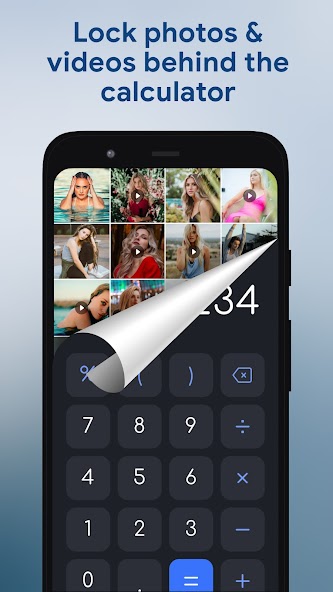
Top Features of HideU: Calculator Lock Mod APK
- Secure Data Protection HideU: Calculator Lock provides a unique layer of security for your sensitive files and apps by disguising itself as a calculator. This ensures that your private information stays hidden from prying eyes while giving you easy access when needed.
- User-Friendly Interface The app features a simple and intuitive design that allows users to navigate effortlessly. Its calculator interface is familiar, making it easy for anyone to use without additional tutorials or guidance.
- Password Encryption HideU utilizes advanced encryption methods to safeguard your files and applications. This ensures that even if someone manages to access your hidden vault, they will be unable to view or manipulate your precious data without the correct password.
- Multiple Vaults Creation Users can create multiple vaults within the app, each with its own separate password. This feature allows for organized storage of different types of content, whether it be photos, videos, or documents, catering to various privacy needs.
- Stealth Mode Functionality Activate stealth mode to render the app discreet when accessed. This feature disguises the app's true purpose, showing a simple calculator interface instead, which adds an extra layer of security and peace of mind for users worried about privacy.
- Recovery Options In case you forget your password, HideU offers recovery options to retrieve access. This supportive feature ensures that users do not lose their valuable content and can regain access to their files without losing data permanently.

Requirements to Install HideU: Calculator Lock
- Operating System: 5.0 and up or higher
- RAM Required: Minimum 1 GB
- Storage Required: 194 MB
- Internet Required: An active internet
Additional Recommendations
- Storage Space: At least 194 MB of free
- Internet Connection: Stable Wi-Fi or mobile data
- Account: no needed
Step-by-Step Guide to Installing HideU: Calculator Lock Mod APK
- Step 1: Enable "Install Unknown Apps" (or "Unknown Sources")
- Step 2: Download HideU: Calculator Lock Mod APK File from HappyMod.net
- Step 3: Locate the Downloaded APK File
- Step 4: Install HideU: Calculator Lock Mod APK File
- Step 5: Launch the App
Additional tips for HideU: Calculator Lock Mod APK
Clear Cache Regularly: If HideU: Calculator Lock starts to feel sluggish or behave unexpectedly, try clearing its cache. Go to Settings > Apps > HideU: Calculator Lock > Storage & cache, then tap "Clear cache." This often resolves minor performance hiccups without losing your data. Free Up Storage: Ensure your device has sufficient free internal storage. Low storage can significantly impact HideU: Calculator Lock's performance and even prevent updates or proper functioning. Close Background Apps: If you're experiencing lag, try closing other heavy apps running in the background. This frees up RAM for HideU: Calculator Lock to run more smoothly.

Conclusion
HideU: Calculator Lock successfully merges functionality and security, offering users a unique solution for privacy protection. Its innovative approach disguises sensitive information within a calculator interface, making it discreet and accessible. This application caters to those seeking a secure method to store personal data, photos, and files, while ensuring that the presence of sensitive materials remains hidden from prying eyes.The user interface is intuitive, allowing for easy navigation and use, which enhances the overall user experience. The app’s ability to lock away content securely behind a calculator facade is particularly appealing in environments where privacy is paramount. It not only prevents unauthorized access but also does so in a manner that maintains user discretion.Moreover, the app integrates additional security features such as password protection and decoy modes, providing an enhanced layer of protection. Regular updates and improvements further bolster its security measures, ensuring that users can rely on it to safeguard their sensitive information consistently.In conclusion, HideU: Calculator Lock stands out as an effective and practical solution for individuals looking to protect their privacy in a digital age. Its unique disguise feature, coupled with robust security options, makes it an essential tool for anyone concerned about unauthorized access to personal data.

FAQS-FREQUENTLY ASK QUESTION
How do I set up a hidden calculator lock?
To set up a hidden calculator lock, open the app and go through the initial setup. You'll be prompted to create a password. After that, you can add apps or files you want to protect.
Can I change the password later?
Yes, you can change your password at any time. Go to the app settings, find the option for password management, and follow the prompts to update your password.
What should I do if I forget my password?
If you forget your password, you can use the recovery options provided within the app. Follow the prompts to reset your password through your security question or recovery email, if set up.
How can I hide the app icon from my home screen?
To hide the app icon, navigate to the app settings. Look for the option labeled 'Hide Icon' or 'Launch Options.' Follow the on-screen prompts to successfully hide the icon from your home screen.
How do I manage the apps I have locked?
To manage your locked apps, open the HideU app, enter your password, and go to the 'Locked Apps' section. From there, you can add new apps, remove existing ones, or modify their lock settings.
![Elite Auto Brazil - Wheelie Mod Apk [Unlimited money]](https://i.git99.com/upload/android/icon/2025/08/08/50f54ef505d7916b6c777ed4c915617d.webp)
![Motivation - Daily quotes Mod Apk [Unlocked][Premium]](https://i.git99.com/upload/android/icon/2023/12/14/e56527b2371bcda6768f230a1a1c8e75.webp)
![Music Ringtones for Android Mod Apk [Unlocked][Pro]](https://i.git99.com/upload/android/icon/2026/04/03/d311fe628d7bcf7718a4c5a0355822f5.webp)
![RS Boxing Champions Mod Apk [Unlimited money]](https://i.git99.com/upload/android/icon/2024/01/17/01805e4853e98fe79cef323b2ddd322d.webp)
![City Island 6: Building Town Mod Apk [Unlimited money]](https://i.git99.com/upload/android/icon/2026/03/10/47eb58c37b68212cf651e0be82ce784c.webp)
![Symfonium: Music player & cast Mod Apk [Unlocked][Premium]](https://i.git99.com/upload/android/icon/2026/03/16/7cccd9423b66fe0c51f93e0dcd5004a4.webp)
![ARK: Ultimate Mobile Edition Mod Apk [Unlocked]](https://i.git99.com/upload/android/icon/2025/01/06/810c37317641c5c026793e623f92b68a.webp)
![Age of Magic: Turn Based RPG Mod Apk [High Damage][Invincible]](https://i.git99.com/upload/android/icon/2026/06/01/e250b34c6a7654f94a9654e5a8856516.webp)
1.Rate
2.Comment
3.Name
4.Email